Dino Jump - Running Backwards in Time
A retro-inspired dinosaur platformer where the player travels backward through time, collecting enough energy to face the meteor that ended everything.
Role
UX/Game Designer
Timeline
1 month
Tools
Claude
Figma
Sprite packs
HTML/CSS/JS
Team
Just me
Contribution
Built the game
00 THE ORIGIN
The idea started with the Chrome dinosaur game.
I wanted to keep the interaction simple: a dinosaur, a running path, and obstacles to jump over. The Chrome no-internet game already had that stripped-down feeling, but after researching it, I found out it was actually built in 2013 in a deliberately old-school style. That became the starting point for this project.
01 THE STORYLINE
Turning a runner into a time-travel story.
Once I knew I wanted to make a dinosaur runner, I needed a reason for the game to exist beyond jumping over objects. The storyline became the structure: Rex travels backward through three eras to reach the primitive world and fight the meteor before it destroys everything.
01 DESIGN THESIS
Making time travel visible through visual regression.
The main design idea was to make the game feel like it was moving backward in time without overcomplicating the gameplay. Instead of relying only on story text, each era would visually lose detail and become more primitive.


02 BUILDING WITH AI
Claude became a thinking partner, not just a coding tool.
This was my first time making a game, so I built it step by step while working conversationally with Claude. I used Claude to understand what to build next, how to structure the game, and what technical decisions made sense. I still made the design choices myself.
Claude suggested using sprite packs instead of drawing every asset from scratch.
I reviewed different packs and chose Kenney assets because they could support the eras I wanted to create.
I used the conversation to brainstorm mechanics, troubleshoot bugs, and decide what was worth building.
The process felt collaborative: Claude gave options, and I chose the direction that matched the game.

03 GAMEPLAY SYSTEM
Simple mechanics, with a clear reason to keep playing.
The gameplay developed while I built the game. I wanted the chicken collection mechanic to matter, not just exist as decoration. Chickens became energy for the final boss fight: fewer chickens meant a weaker fight, and more chickens gave the player a better chance.
Running and Jumping
The main loop stays simple and familiar: move through the level, jump over obstacles, and avoid damage.
Chicken Collection
Chickens act as collectible energy, giving the player a reason to take risks and explore the path.
Battery Display
I represented collected chickens as a battery so players could clearly understand they were building power.
Three Lives
Each round gives the player three lives. It is forgiving, but still creates enough stakes to make the level feel active.
04 TECHNICAL CHALLENGES
The hardest part was understanding what the game engine needed from me.
I started by assuming Claude could take a sprite pack or a full scene and build the game from there. The reality was different. I had to learn how to break the game into usable parts, give Claude enough context, and hand over every state and layer the game needed.
Challenge 1
Scene Layering
At first, I exported whole scenes from Figma as one image. That did not work because the background, course, hitboxes, rewards, chickens, NPCs, and obstacles all needed to be separate layers with their own behavior.

Background
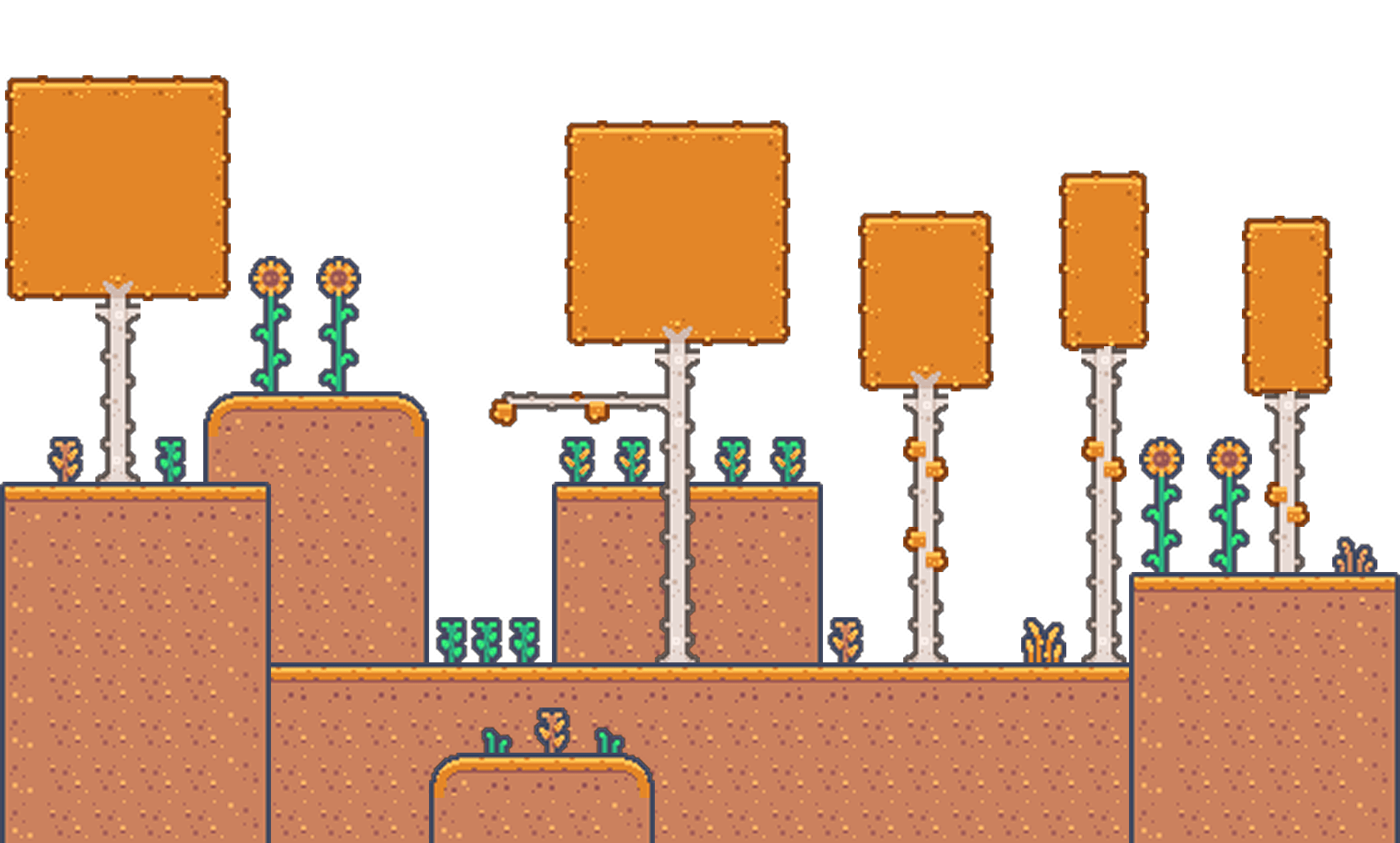
Obstacle course

Reward map

Hit boxes
Challenge 2
Sprite States
The characters could not just be single images. Rex and the NPCs needed separate sprite states for standing, walking, running, jumping, and collisions so the game could animate them properly.

Challenge 3
Claude could not build the scene for me
I wanted to hand Claude a sprite pack and have it build the full game scene, but that was not realistic. I had to understand Claude's limitations and give it much more context: which assets to use, what each layer represented, what each state meant, and how the level should behave.

05 SOUND
Music helped define the pace and emotional tone.
I wanted the game to feel different during gameplay, between stages, and at the ending. Music became part of how the player understood the energy of the game, not just something placed in the background.
Game Intro
Game Play
Game Complete
05 SOUND
The top bar had to teach the player without distracting them.
A lot of the UX work was in the small visual systems: how lives were shown, how collecting chickens turned into power, and how the player understood what they needed before reaching the final fight.
06 REFLECTION
What this project taught me.
This project taught me how much game design depends on small systems working together. A simple running game still required visual direction, asset organization, collision logic, animation states, sound, pacing, and clear player feedback.
Check out more of my work

2025 • B2C • Documentation for Data and AI
Stardog | Documentation, Findability
A research-driven rebuild projected to cut support tickets 20–35% and halve the path to key content.
Read Full Story
2025 • B2B • Recruitment Tool
Hack4Impact | Internal Tool, Recruitment
500+ applications processed, review cut from 6 steps to 2, 10+ hours saved per cycle for the admin, 33-page form to a 4-step flow
Read Full Story